Are Notion Pages Private by Default?
Updated:
One common question among Notion users, especially those who are just getting started, is about the privacy settings of Notion pages. Let's break it down.
When you create a new Notion page, its visibility is set to private by default. This means that only you can view and edit the page. However, if you create a page in a shared area like a workspace or teamspace, other members might see it too.
Can anyone outside of my workspace read Notion pages?
No, not unless you explicitly share or make the page public. By default, pages are private to you or the people within your workspace. However, Notion provides sharing options that allow you to:
- Share the page with specific or all members of your workspace
- Create a public link that anyone with the link can view
- Make the page discoverable by search engines
When in doubt, double-check the Share settings of a particular page.
Can Notion integrations read my pages?
Yes, but only pages you specifically allow. When you grant read access, an integration can view both the top-level page and all its nested pages.
However, new top-level pages remain private by default – you'll need to manually grant access to each one you want the integration to read.
Is Notion end-to-end encrypted?
Notion encrypts data both at rest and in transit, but it does not offer end-to-end encryption (which means that your data is encrypted on your device and only decrypted on the recipient's device, so Notion cannot access your data without your permission)
Avoid storing sensitive information such as passwords, personal IDs, or confidential business data in your workspace.
Does Notion sell my data?
No. Notion's privacy policy states they do not sell personal information or share it with third parties for marketing purposes. You own your content, and Notion doesn't monetize it.
Does Notion use my data to train AI?
No. According to Notion's AI security practices, they don't use customer data to train AI models. Their subprocessors (OpenAI, Anthropic) are contractually prohibited from doing so as well.
When you use Notion AI, your content is sent to these providers for processing, but it's not retained or used for training. Enterprise customers also get zero-retention policies for AI requests.
Can my employer see my private Notion pages?
If you're using a company workspace, keep in mind that workspace owners have more access than you might expect.
On Enterprise plans, workspace owners can use Content Search to find any page – including private ones – and grant themselves access. Once they have access, those pages can be included in workspace exports. They also have audit logs that show who viewed or edited what.
If you want to keep personal notes truly private, create a separate workspace under your own account. That way, your employer has no access to it at all.
How to make a Notion page publicly accessible?
If you wish to share your Notion page with anyone, you can create a shareable link for public access.
Plus plan subscribers can make pages visible to search engines – useful for public documentation, portfolios, or any content you want people to find online.
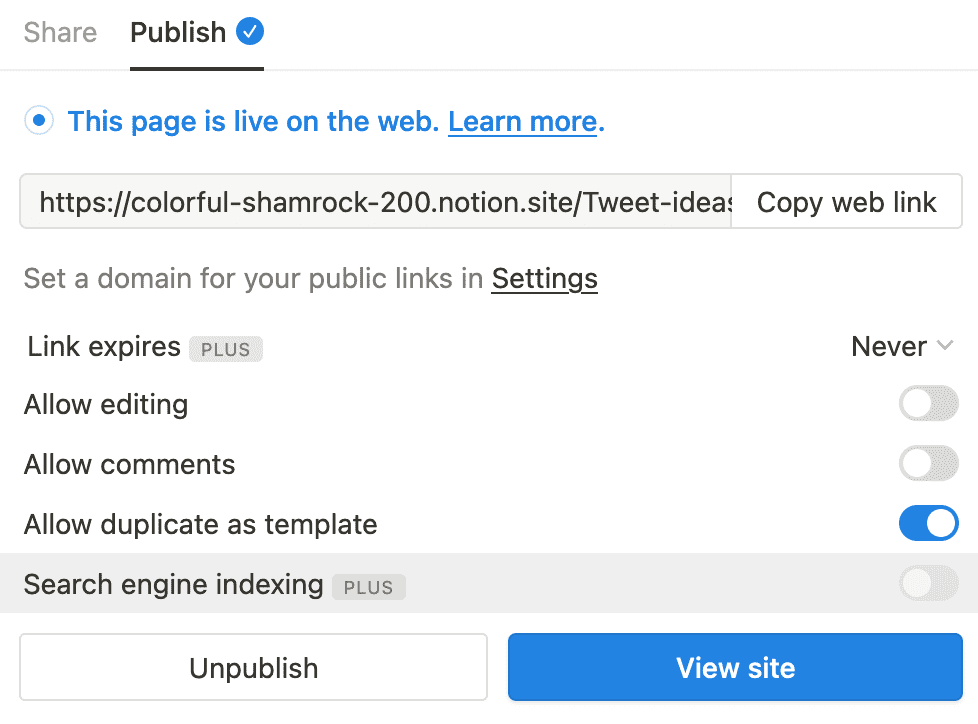
You can control who has access to your pages by setting different permission levels such as full access, can edit, can comment, or can view. This way, you can easily grant the right level of access to different individuals or groups.
What's the difference between Workspace, Teamspaces, Shared and Private sections?
Workspace
A Workspace is your main container in Notion where all your pages and databases live. You can create multiple workspaces or keep everything in one. By default, your workspace is private – others can only access content when you specifically invite them or make pages public.
Teamspaces
This is a shared space where multiple members can collaborate. Any page created within a teamspace can be viewed and edited by members of that teamspace, depending on the permissions set by the admin.
Teamspaces let multiple members collaborate on projects and notes, with the option to set specific pages as private for selected team members or individual use.
Custom groups help manage page permissions and member access. By combining groups with Teamspaces, you can control who sees what based on roles and team hierarchies.
Shared
Shared sections are pages or databases that you share with specific people or groups.
Unlike Teamspaces which are open to all members, shared sections give you precise control over who can view or edit individual pages. This helps maintain privacy while still enabling collaboration.
Private
Private pages stay hidden from other Teamspace members. These are perfect for personal notes, drafts, or any content you want to keep to yourself – like having your own private workspace within the team environment.
To sum up, Workspace is the main container for all content, Teamspaces are shared spaces for collaboration, Shared sections are specific pages shared with selected individuals or groups, and Private pages are only accessible to the individual who created them.
Back up your Notion workspaces today
Get started