Notion to Anki Converter
Convert any public Notion page to flashcards (.apkg or .csv) for free.
Your flashcards are ready!
Your flashcards are safe — but are your Notion notes?
Notion Backups automatically saves your entire workspace to Google Drive, Dropbox, or OneDrive — every day.
Try Notion Backups free →How it works
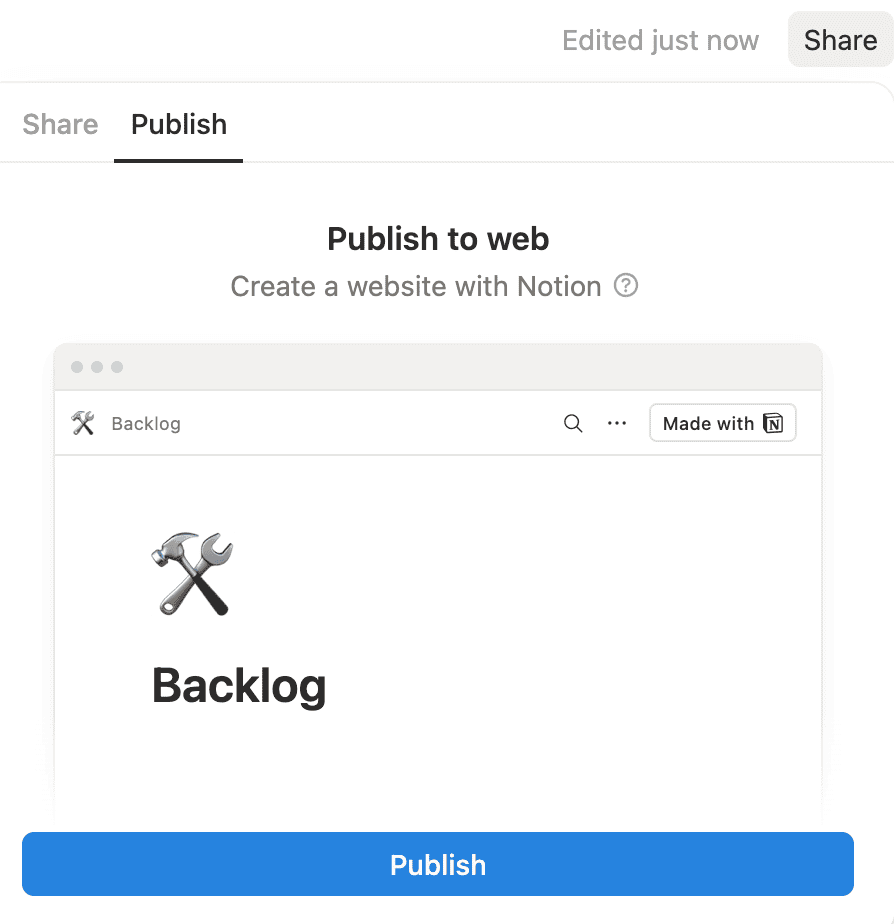
Step 1: Publish your Notion page to the web
Open your Notion page and click the Share button in the top-right corner. Select the Publish tab, then click Publish to make your page publicly accessible.
Step 2: Copy the page URL
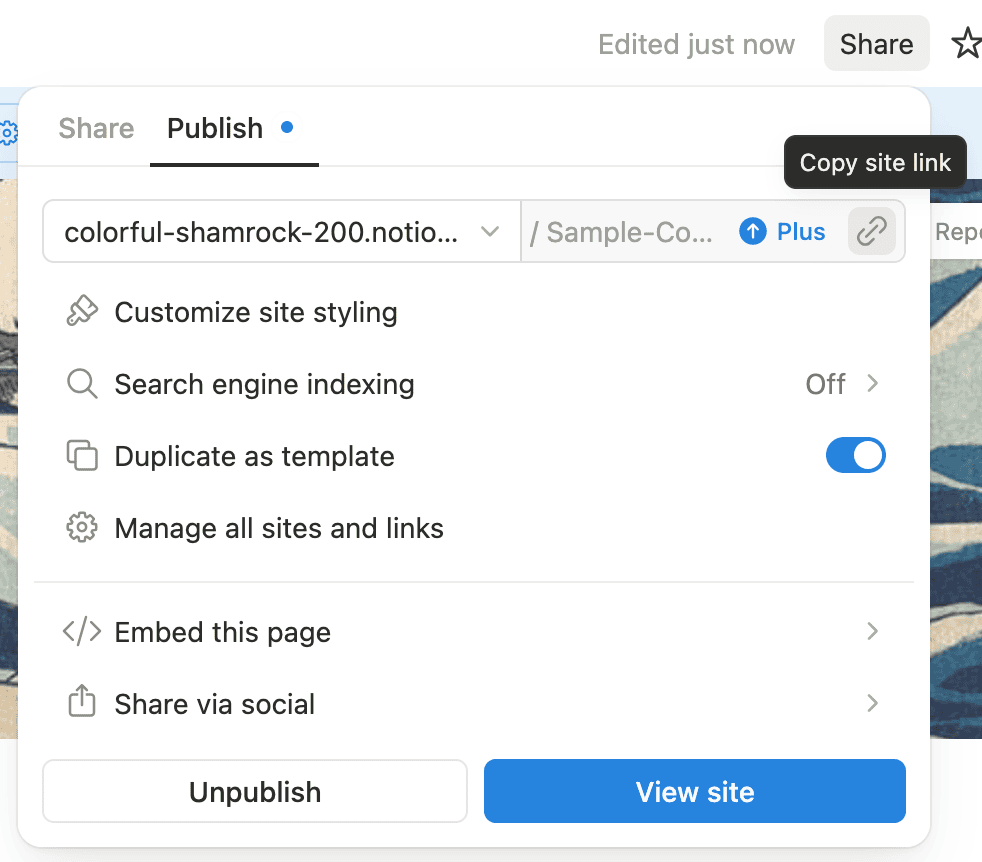
Once published, you can get the URL by clicking the Copy site link button, or by clicking View site and copying the URL from your browser's address bar. The URL will look something like https://yourname.notion.site/Page-Title-abc123.
Step 3: Paste the URL and convert
Paste the URL in the field above. Your Notion page should contain toggle blocks — each toggle becomes one flashcard, with the toggle header as the front and the content inside as the back.
Step 4: Download and import into Anki
Click "Generate Anki Deck" and wait a few seconds. Download the .apkg file and open it with Anki (desktop or mobile) to start studying with spaced repetition.
Frequently Asked Questions
- What Notion blocks are converted to cards?
- Toggle blocks and toggle headings (H1, H2, H3) become Basic, Reversed, or Type-in cards. Top-level paragraphs with yellow-highlighted text automatically become Cloze (fill-in-the-blank) cards — each highlighted phrase becomes a cloze deletion. Images, formatting, and nested content are preserved.
- Are images included in the Anki deck?
- Yes. Images inside toggle blocks are downloaded and embedded directly in the .apkg file. They work offline and will never break, unlike other tools that link to expiring URLs.
- Will re-importing create duplicate cards?
- No. Each card has a deterministic ID based on the page URL and card content. Re-importing the same page updates existing cards instead of creating duplicates, so your review history and scheduling are preserved.
- Why does my page need to be public?
- We need to access your page to extract the flashcard content. Without "Share to web" enabled, we can't fetch the page. We don't store any of your content.
- Do you store or log my content?
- No. We don't store or log any of your content. The conversion process happens on a serverless infrastructure.
- How should I structure my Notion page for best results?
- Use toggle blocks or toggle headings where the header is the question (front of card) and the content inside is the answer (back of card). You can include images, formatted text, lists, and code blocks inside toggles. Use toggle headings (type
/toggle headingin Notion) if you want larger, styled card fronts. - What card types are supported?
- Four Anki card types: Basic (flip to reveal), Basic (and reversed card) which tests both directions, Basic (type in the answer) which lets you type your answer, and Cloze (fill-in-the-blank). Toggle blocks become Basic/Reversed/Type-in cards. Cloze cards are created automatically from paragraphs with yellow-highlighted text — each highlighted phrase becomes a cloze deletion.
- How do cloze (fill-in-the-blank) cards work?
- Highlight any text in Notion with a yellow background and it automatically becomes a cloze deletion. For example, "The capital of France is Paris" produces a card with a blank: "The capital of France is [...]". You can optionally add an
Extra:paragraph right after for additional context on the answer side. Cloze cards are created alongside toggle cards, so you can mix both on the same page. - How are nested toggles handled?
- Nested toggles (a toggle inside another toggle) are extracted as separate cards. The parent toggle's back will include the nested toggle content for full context, and the nested toggle also becomes its own card. This gives you both the big-picture view and focused cards for each sub-topic.
- Can I export to Quizlet, Mochi, or other flashcard apps?
- Yes. Choose .csv as the export format to get a tab-separated file that can be imported into Quizlet, Mochi, Brainscape, RemNote, and most other flashcard apps. The .apkg format is for Anki only.
- Need a PDF, Word, Markdown, or Excel export instead?
- Try our Notion to PDF exporter, Notion to Word converter, Notion to Markdown converter, or Notion to Excel converter for database views.
Back up your Notion workspaces today
Get started